lattpy.basis
Basis object for defining the coordinate system and unit cell of a lattice.
- class lattpy.basis.LatticeBasis(basis, **kwargs)[source]
Bases:
objectLattice basis for representing the coordinate system and unit cell of a lattice.
The
LatticeBasisobject is the core of any lattice model. It defines the basis vectors and subsequently the coordinate system of the lattice and provides the necessary basis transformations between the world and lattice coordinate system.- Parameters:
- basis: array_like or float or LatticeBasis
The primitive basis vectors that define the unit cell of the lattice. If a
LatticeBasisinstance is passed it is copied and used as the new basis.- **kwargs
Key-word arguments. Used only when subclassing
LatticeBasis.
Examples
>>> import lattpy as lp
>>> import matplotlib.pyplot as plt
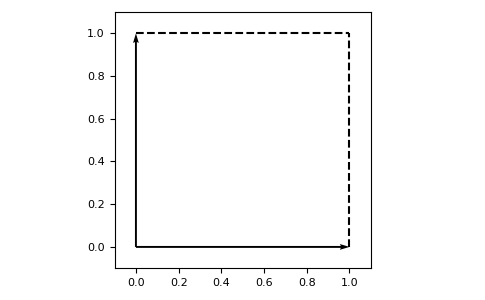
>>> basis = lp.LatticeBasis.square()
>>> _ = basis.plot_basis()
>>> plt.show()
- Attributes:
dimint: The dimension of the lattice.
vectorsnp.ndarray: Array containing the basis vectors as rows.
vectors3dnp.ndarray: The basis vectors expanded to three dimensions.
normsnp.ndarray: Lengths of the basis vectors.
cell_sizenp.ndarray: The shape of the box spawned by the basis vectors.
cell_volumefloat: The volume of the unit cell defined by the basis vectors.
Methods
chain([a])Initializes a one-dimensional lattice.
square([a])Initializes a 2D lattice with square basis vectors.
rectangular([a1, a2])Initializes a 2D lattice with rectangular basis vectors.
oblique(alpha[, a1, a2])Initializes a 2D lattice with oblique basis vectors.
hexagonal([a])Initializes a 2D lattice with hexagonal basis vectors.
hexagonal3d([a, az])Initializes a 3D lattice with hexagonal basis vectors.
sc([a])Initializes a 3D simple cubic lattice.
fcc([a])Initializes a 3D face centered cubic lattice.
bcc([a])Initializes a 3D body centered cubic lattice.
itransform(world_coords)Transform the world coords
(x, y, ...)into the basis coords(n, m, ...).transform(basis_coords)Transform the basis-coords
(n, m, ...)into the world coords(x, y, ...).itranslate(x)Returns the translation vector and atom position of the given position.
translate(nvec[, r])Translates the given postion vector
rby the translation vectorn.is_reciprocal(vecs[, tol])Checks if the given vectors are reciprocal to the lattice vectors.
reciprocal_vectors([tol, check])Computes the reciprocal basis vectors of the bravais lattice.
reciprocal_lattice([min_negative])Creates the lattice in reciprocal space.
get_neighbor_cells([distidx, ...])Find all neighboring unit cells of the unit cell at the origin.
Computes the Wigner-Seitz cell of the lattice structure.
brillouin_zone([min_negative])Computes the first Brillouin-zone of the lattice structure.
plot_basis([lw, ls, margins, grid, ...])Plot the lattice basis.
- RVEC_TOLERANCE = 1e-06
- classmethod rectangular(a1=1.0, a2=1.0, **kwargs)[source]
Initializes a 2D lattice with rectangular basis vectors.
- classmethod oblique(alpha, a1=1.0, a2=1.0, **kwargs)[source]
Initializes a 2D lattice with oblique basis vectors.
- classmethod hexagonal(a=1.0, **kwargs)[source]
Initializes a 2D lattice with hexagonal basis vectors.
- classmethod hexagonal3d(a=1.0, az=1.0, **kwargs)[source]
Initializes a 3D lattice with hexagonal basis vectors.
- property dim
int: The dimension of the lattice.
- property vectors
np.ndarray: Array containing the basis vectors as rows.
- property vectors3d
np.ndarray: The basis vectors expanded to three dimensions.
- property norms
np.ndarray: Lengths of the basis vectors.
- property cell_size
np.ndarray: The shape of the box spawned by the basis vectors.
- property cell_volume
float: The volume of the unit cell defined by the basis vectors.
- itransform(world_coords)[source]
Transform the world coords
(x, y, ...)into the basis coords(n, m, ...).- Parameters:
- world_coords(…, N) array_like
The coordinates in the world coordinate system that are transformed into the lattice coordinate system.
- Returns:
- basis_coords(…, N) np.ndarray
The coordinates in the lattice coordinate system.
Examples
Construct a lattice with basis vectors \(a_1 = (2, 0)\) and \(a_2 = (0, 1)\):
>>> latt = LatticeBasis([[2, 0], [0, 1]])
Transform points into the coordinate system of the lattice:
>>> latt.itransform([2, 0])
[1. 0.]
>>> latt.itransform([4, 0])
[2. 0.]
>>> latt.itransform([0, 1])
[0. 1.]
- transform(basis_coords)[source]
Transform the basis-coords
(n, m, ...)into the world coords(x, y, ...).- Parameters:
- basis_coords(…, N) array_like
The coordinates in the lattice coordinate system that are transformed into the world coordinate system.
- Returns:
- world_coords(…, N) np.ndarray
The coordinates in the cartesian coordinate system.
Examples
Construct a lattice with basis vectors \(a_1 = (2, 0)\) and \(a_2 = (0, 1)\) :
>>> latt = LatticeBasis([[2, 0], [0, 1]])
Transform points into the world coordinat system:
>>> latt.itransform([1, 0])
[2. 0.]
>>> latt.itransform([2, 0])
[4. 0.]
>>> latt.itransform([0, 1])
[0. 1.]
- translate(nvec, r=0.0)[source]
Translates the given postion vector
rby the translation vectorn.The position is calculated using the translation vector \(n\) and the atom position in the unitcell \(r\):
\[R = \sum_i n_i v_i + r\]- Parameters:
- nvec(…, N) array_like
Translation vector in the lattice coordinate system.
- r(N) array_like, optional
The position in cartesian coordinates. If no vector is passed only the translation is returned.
- Returns:
- r_trans(…, N) np.ndarray
The translated position.
Examples
Construct a lattice with basis vectors \(a_1 = (2, 0)\) and \(a_2 = (0, 1)\):
>>> latt = LatticeBasis([[2, 0], [0, 1]])
Translate the origin:
>>> n = [1, 0]
>>> latt.translate(n)
[2. 0.]
Translate a point:
>>> p = [0.5, 0.5]
>>> latt.translate(n, p)
[2.5 0.5]
Translate a point by multiple translation vectors:
>>> p = [0.5, 0.5]
>>> nvecs = [[0, 0], [1, 0], [2, 0]]
>>> latt.translate(nvecs, p)
[[0.5 0.5]
 [2.5 0.5]
 [4.5 0.5]]
- itranslate(x)[source]
Returns the translation vector and atom position of the given position.
- Parameters:
- x(…, N) array_like or float
Position vector in cartesian coordinates.
- Returns:
- nvec(…, N) np.ndarray
Translation vector in the lattice basis.
- r(…, N) np.ndarray, optional
The position in real-space.
Examples
Construct a lattice with basis vectors \(a_1 = (2, 0)\) and \(a_2 = (0, 1)\):
>>> latt = LatticeBasis([[2, 0], [0, 1]])
>>> latt.itranslate([2, 0])
(array([1., 0.]), array([0., 0.]))
>>> latt.itranslate([2.5, 0.5])
(array([1., 0.]), array([0.5, 0.5]))
- is_reciprocal(vecs, tol=1e-06)[source]
Checks if the given vectors are reciprocal to the lattice vectors.
The lattice- and reciprocal vectors \(a_i\) and \(b_i\) must satisfy the relation
\[a_i \cdot b_i = 2 \pi \delta_{ij}\]To check the given vectors, the difference of each dot-product is compared to \(2\pi\) with the given tolerance.
- Parameters:
- vecsarray_like or float
The vectors to check. Must have the same dimension as the lattice.
- tolfloat, optional
The tolerance used for checking the result of the dot-products.
- Returns:
- is_reciprocalbool
Flag if the vectors are reciprocal to the lattice basis vectors.
- reciprocal_vectors(tol=1e-06, check=False)[source]
Computes the reciprocal basis vectors of the bravais lattice.
The lattice- and reciprocal vectors \(a_i\) and \(b_i\) must satisfy the relation
\[a_i \cdot b_i = 2 \pi \delta_{ij}\]- Parameters:
- tolfloat, optional
The tolerance used for checking the result of the dot-products.
- checkbool, optional
Check the result and raise an exception if it does not satisfy the definition.
- Returns:
- v_recnp.ndarray
The reciprocal basis vectors of the lattice.
Examples
Reciprocal vectors of the square lattice:
>>> latt = LatticeBasis(np.eye(2))
>>> latt.reciprocal_vectors()
[[6.28318531 0.        ]
 [0.         6.28318531]]
- reciprocal_lattice(min_negative=False)[source]
Creates the lattice in reciprocal space.
- Parameters:
- min_negativebool, optional
If True the reciprocal vectors are scaled such that there are fewer negative elements than positive ones.
- Returns:
- rlattLatticeBasis
The lattice in reciprocal space
See also
reciprocal_vectorsConstructs the reciprocal vectors used for the reciprocal lattice
Examples
Reciprocal lattice of the square lattice:
>>> latt = LatticeBasis(np.eye(2))
>>> rlatt = latt.reciprocal_lattice()
>>> rlatt.vectors
[[6.28318531 0.        ]
 [0.         6.28318531]]
- get_neighbor_cells(distidx=0, include_origin=True, comparison=<function isclose>)[source]
Find all neighboring unit cells of the unit cell at the origin.
- Parameters:
- distidxint, default
Index of distance to neighboring cells, default is 0 (nearest neighbors).
- include_originbool, optional
If True the origin is included in the set.
- comparisoncallable, optional
The method used for comparing distances.
- Returns:
- indicesnp.ndarray
The lattice indeices of the neighboring unit cells.
Examples
>>> latt = LatticeBasis(np.eye(2))
>>> latt.get_neighbor_cells(distidx=0, include_origin=False)
[[-1  0]
 [ 0 -1]
 [ 0  1]
 [ 1  0]]
- wigner_seitz_cell()[source]
Computes the Wigner-Seitz cell of the lattice structure.
- Returns:
- ws_cellWignerSeitzCell
The Wigner-Seitz cell of the lattice.
- brillouin_zone(min_negative=False)[source]
Computes the first Brillouin-zone of the lattice structure.
Constructs the Wigner-Seitz cell of the reciprocal lattice
- Parameters:
- min_negativebool, optional
If True the reciprocal vectors are scaled such that there are fewer negative elements than positive ones.
- Returns:
- ws_cellWignerSeitzCell
The Wigner-Seitz cell of the reciprocal lattice.
- get_cell_superindex(index, shape)[source]
Converts a cell index to a super-index for the given shape.
The index of a unit cell is the translation vector.
- Parameters:
- indexarray_like or (N, D) np.ndarray
One or multiple cell indices. If a numpy array is passed the result will be an array of super-indices, otherwise an integer is returned.
- shape(D, ) array_like
The shape for converting the index.
- Returns:
- super_indexint or (N, ) int np.ndarray
The super index. If index is a numpy array, super_index is an array of super indices, otherwise it is an integer.
- get_cell_index(super_index, shape)[source]
Converts a super index to the corresponding cell index for the given shape.
The index of a unit cell is the translation vector.
- Parameters:
- super_indexint or (N,) int np.ndarray
One or multiple super indices.
- shape(D, ) array_like
The shape for converting the index.
- Returns:
- indexnp.ndarray
The cell index. Of shape (D,) if super_index is an integer, otherwise of shape (N, D).
- plot_basis(lw=None, ls='--', margins=0.1, grid=False, show_cell=True, show_vecs=True, adjustable='box', ax=None, show=False)[source]
Plot the lattice basis.
- Parameters:
- lwfloat, optional
The line width used for plotting the unit cell outlines.
- lsstr, optional
The line style used for plotting the unit cell outlines.
- marginsSequence[float] or float, optional
The margins of the plot.
- gridbool, optional
If True, draw a grid in the plot.
- show_vecsbool, optional
If True the first unit-cell is drawn.
- show_cellbool, optional
If True the outlines of the unit cell are plotted.
- adjustableNone or {‘box’, ‘datalim’}, optional
If not None, this defines which parameter will be adjusted to meet the equal aspect ratio. If ‘box’, change the physical dimensions of the Axes. If ‘datalim’, change the x or y data limits. Only applied to 2D plots.
- axplt.Axes or plt.Axes3D or None, optional
Parent plot. If None, a new plot is initialized.
- showbool, optional
If True, show the resulting plot.